Every Core dna product, release by release, newest first. Each product ships on its own schedule.
Platform2026.10
What’s new in Core dna Platform 2026.10
Fulfilments and Warehouse Allocation
Orders can now be allocated to the warehouses that hold their stock, and staff move each fulfilment from packing to delivery on the order page. The file selector reopens in its last folder.
Key highlights
Fulfilments on the order page: staff mark each fulfilment ready, add its parcels with their tracking codes, mark it delivered or collected, and print A4 packing slips.
Warehouse allocation and stock holds: with inventory tracking on, each order goes to the warehouses that hold its stock, and that stock is held for the order until it ships.
Fulfilments API: integrations can add, change and remove fulfilments and take them through the same steps as the admin.
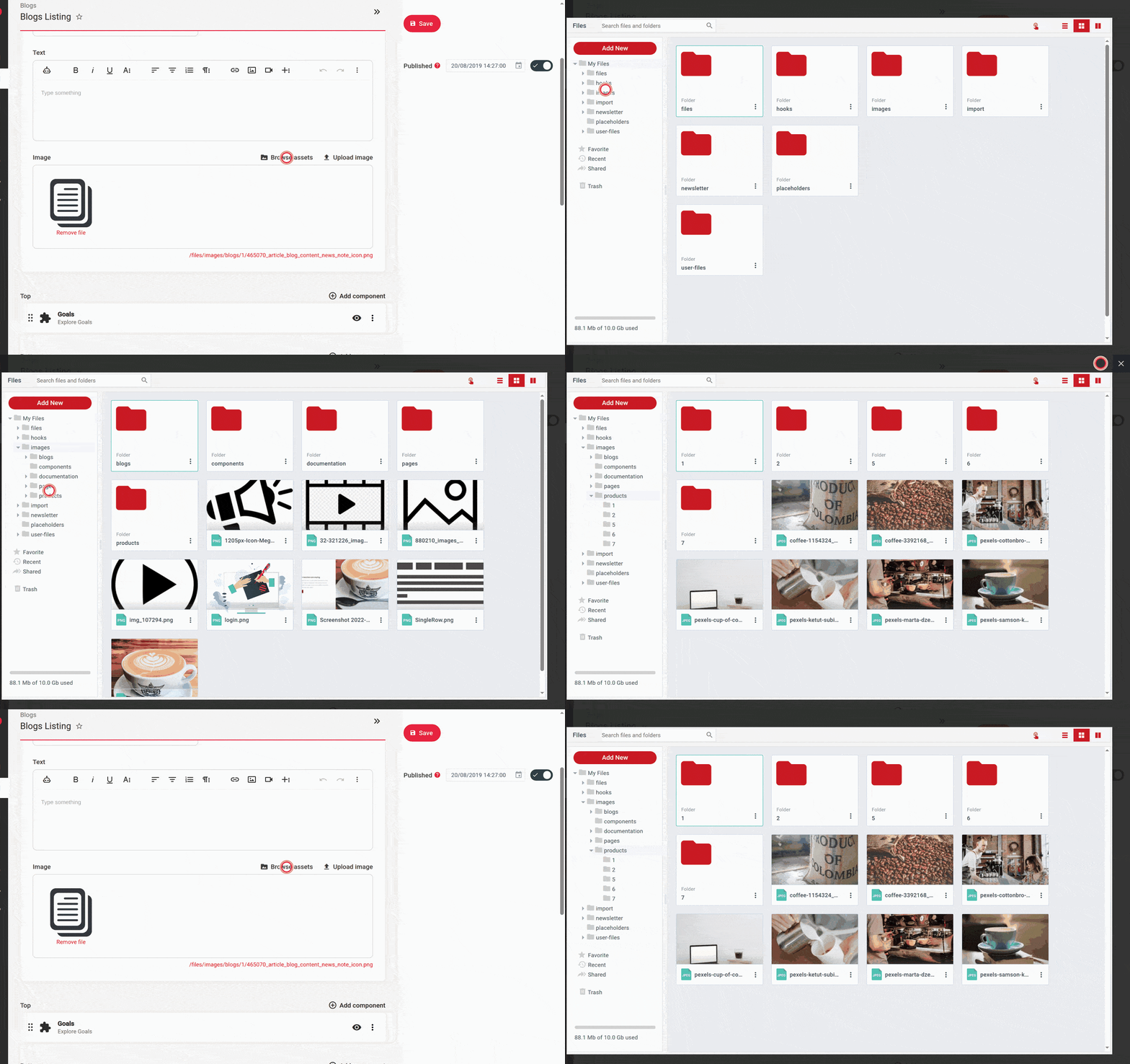
The file selector remembers its folder: Browse assets reopens in the folder you last used on the same edit page.
Changes in behaviour
Order page: every order with a fulfilment now shows the fulfilment cards, the Activity panel and a Print packing slips button. Fulfilments from before this release keep their status, and their earlier steps show no times.
Fulfillments in the admin: Fulfillments moves from Transactions › Inventory to Transactions › Orders, and lists only the fulfilments of placed orders. A fulfilment's status now changes only through its buttons and the API steps. The edit form with a Status field is gone, and a job or an import that sets the status directly fails with "A fulfillment status changes only through its lifecycle actions, which move the stock and log the change".
Fulfilments in the API: GET /cdna-api/inventory/fulfillments returns a fixed set of fields, and only the fulfilments of placed orders. warehouse, deliveryAddress, selectedShippingRate, fulfillmentItems and shipments are objects instead of ids, and shippingRates, transactions and editUrl are left out unless the request names them in properties.
Choosing a shipping rate: PUT /cdna-api/checkout/{uuid}/shipping/{id} with a rate that has expired or is not one of the checkout's rates now returns 422 with "Shipping rate {id} is not available for this checkout. Choose shipping again."
Status labels: in templates and the API, a pickup's statuses now read "Ready for collection" and "Collected", and a fulfilment with nothing to ship reads "Delivered digitally". A theme that compares labels should compare the getStatus() value instead.
Shipping groups: Same warehouse is now on for every shipping group. It has an effect only with inventory tracking on.
Digital-only stores: each order keeps one pending fulfilment until Nothing to ship is switched on for its shipping method.
Interface language: on a site with localization on or more than one supported content language, a page, blog post, book page, FAQ, custom entity record, product page or category page now shows its interface text in its own language, even when the visitor's cdna_locale cookie names another. The cart, the checkout, the account pages and listing pages still follow the cookie.
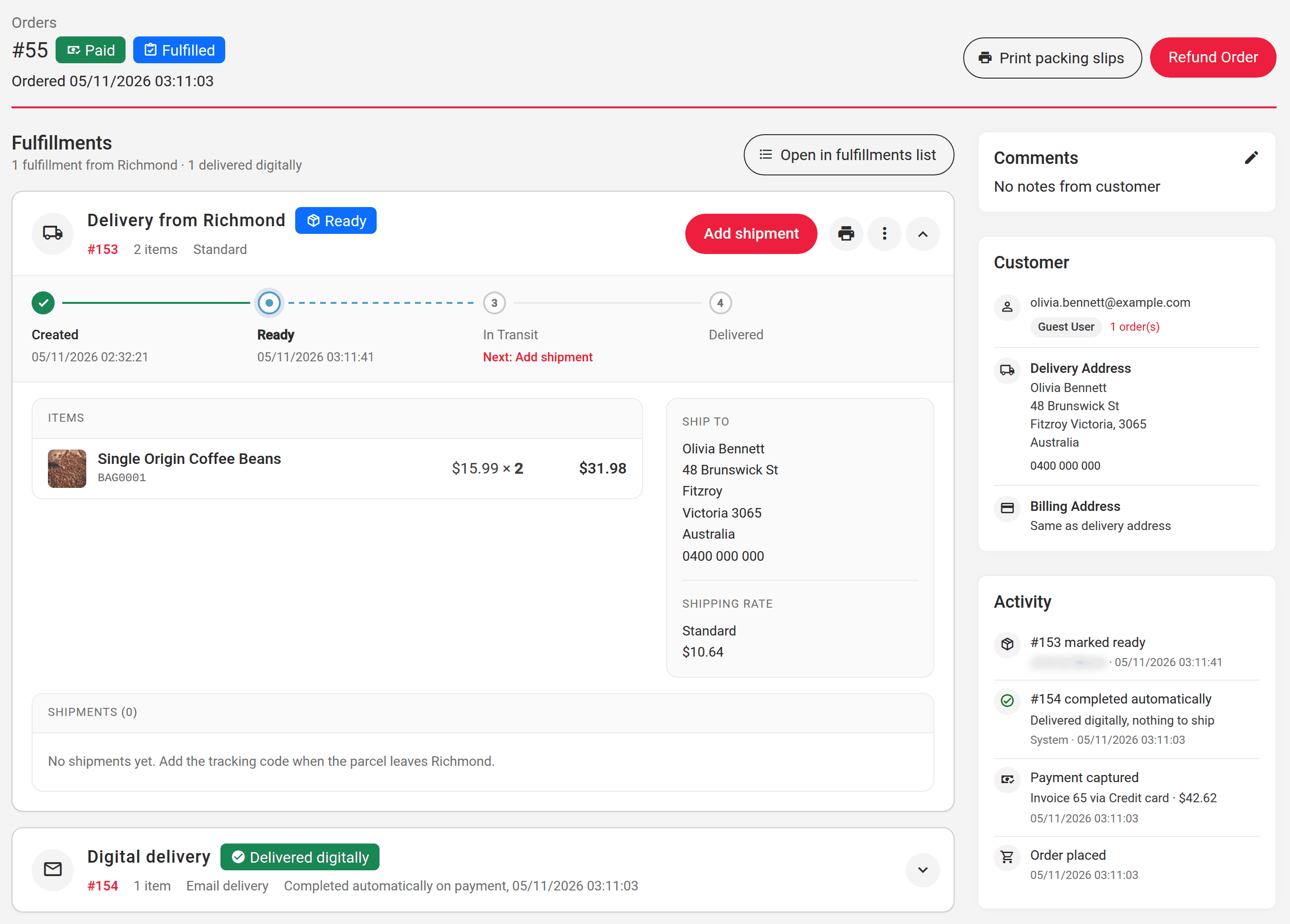
Fulfilments on the order page
A fulfilment is a set of an order's items that leave together. The order page now shows a card for each one, with its items, its warehouse, the delivery address or the pickup location, the shipping rate the customer chose and its parcels with their tracking codes. The buttons on the card take it through its steps:
Mark ready once it is picked and packed, or Mark ready for collection for a pickup.
Add shipment records a parcel with its tracking code. The first parcel moves the fulfilment to In Transit.
Mark delivered when the parcels have arrived, or Mark collected when the customer has collected a pickup.
Cancel fulfillment, in the card's menu, returns the stock held for it to available stock. It does not refund the customer; Refund Order does that. Items that no active fulfilment covers are listed under Unassigned items, where Add fulfillment places them at a warehouse. The Activity panel beside the order lists each step with its time and the person who took it. The Platform does not email the customer at these steps.
Transactions › Orders › Fulfillments lists the fulfilments of every placed order, newest first, with the customer, the type, the items and the tracking code. Select up to 100 to Mark ready, Mark delivered, Mark collected or Print packing slips at once. A packing slip is one A4 page per fulfilment, with a barcode and the items and quantities, and no prices. Its logo and the support contact printed in its footer are set in Transactions › Configuration › Inventory.
The cards work with inventory tracking on or off. With tracking off, a card reads "No warehouse, stock not tracked", and cancelling it moves no stock.
An order with a delivery and a digital delivery
Warehouse allocation and stock holds
With Enable inventory tracking switched on in Transactions › Configuration › Inventory, the Platform checks stock in the cart and at checkout, allocates every order to warehouses and holds the stock for each order until it ships. The switch is off by default. With it off, checkout works as before: one fulfilment per order, with no warehouse and no stock check.
Delivery: an order goes to the closest warehouse that holds every item. The Delivery allocation strategy can instead try the warehouses in the customer's home region first.
Click and collect: an order is collected from the warehouse the customer chose. With Same warehouse switched off on a pickup shipping group, an order that one warehouse cannot fill can be collected from two.
Distance: warehouses are ranked by their distance to the customer once they have coordinates. Enter a Google Maps Platform key with the Geocoding API enabled as the Google Geocoding API key in Content › Common › Configuration. A warehouse is then geocoded when its address is saved, or with Re-geocode on the warehouse form. Without a key, warehouses are ranked by matching postcode, then state, then country.
Separate fulfillment on a shipping category gives its products a fulfilment of their own, charged its own shipping.
Stock is held when the customer pays. A payment that does not finish within the Checkout Lifetime in Transactions › Configuration › Checkouts, 30 minutes by default, releases the hold. In the cart, a line larger than the stock shows "Only 3 in stock", and a checkout that no warehouse can supply stops with the products and quantities that are short.
Before you switch tracking on, set the Type of each shipping group to Delivery or Pickup. With tracking on, a group with no type offers its methods for both.
Digital products
Shipping methods have a new Nothing to ship switch, for digital products, gift cards and services. A fulfilment sent with such a method needs no warehouse and holds no stock, and it is marked delivered as soon as the order is paid. When you switch it on for a method that already has open fulfilments, the form offers to complete them too; tick that box and they are marked delivered in the background. This works with inventory tracking on or off.
Fulfilments in themes
On the member's order screen, each fulfilment now gives its type and its status in the customer's words. getTypeDisplay() returns Delivery, Pickup or Digital, and a pickup's status reads Ready for collection and then Collected. isPending(), isReady(), isInTransit(), isDelivered() and isCancelled() test the status, isPickup() the type, and getStatusReachedAt() gives the time a status was reached. A shipment's getSafeTrackingUrl() returns its tracking link only when it is a web address.
Template codetemplates/orders/orders/show.html
{* Each fulfilment of the order, with its status and tracking links *}
{foreach $order->getFulfillments() as $fulfillment}
  {if !$fulfillment->isCancelled()}
    <h2>{$fulfillment->getTypeDisplay()}: {$fulfillment->getStatusDisplay()}</h2>
    {if $fulfillment->isPickup() && $fulfillment->isReady()}
      <p>Ready to collect from {$fulfillment->getWarehouse()->getName()|escape}</p>
    {/if}
    {foreach $fulfillment->getShipments() as $shipment}
      {if $shipment->getSafeTrackingUrl()}
        <p><a href="{$shipment->getSafeTrackingUrl()|escape}">Track parcel {$shipment->getTrackingCode()|escape}</a></p>
      {/if}
    {/foreach}
  {/if}
{/foreach}
{# Each fulfilment of the order, with its status and tracking links #}
{% for fulfillment in order.getFulfillments() %}
  {% if not fulfillment.isCancelled() %}
    <h2>{{ fulfillment.getTypeDisplay() }}: {{ fulfillment.getStatusDisplay() }}</h2>
    {% if fulfillment.isPickup() and fulfillment.isReady() %}
      <p>Ready to collect from {{ fulfillment.getWarehouse().getName()|e }}</p>
    {% endif %}
    {% for shipment in fulfillment.getShipments() %}
      {% if shipment.getSafeTrackingUrl() %}
        <p><a href="{{ shipment.getSafeTrackingUrl()|e }}">Track parcel {{ shipment.getTrackingCode()|e }}</a></p>
      {% endif %}
    {% endfor %}
  {% endif %}
{% endfor %}
The fulfilments API
Integrations can now work with fulfilments through the API, under /cdna-api/inventory. GET /fulfillment/{id} reads one. POST /fulfillment adds one for an order's unassigned items. PUT /fulfillment/{id} changes its external ID, or its warehouse while it is pending. DELETE /fulfillment/{id} removes a pending one. POST /fulfillment/{id}/ready, /ship, /deliver, /cancel and /shipment take the same steps as the buttons in the admin. Each change needs the matching permission on fulfilments, and every answer lists the steps the fulfilment allows next in allowedActions.
A checkout with several fulfilments chooses a rate for each one in a single request: PUT /cdna-api/checkout/{uuid}/shipping with the rate ids in ids, one per fulfilment. When many checkouts hold the same products at the same moment, the purchase, and adding a fulfilment or changing its warehouse, can answer 503 with a Retry-After header. Send the request again after that many seconds.
Browse assets on an image or a file field, and Browse assets and Replace image in the rich text editor, now open the selector in the folder you last browsed on the same edit page, with the folder tree opened down to it. The folder is remembered until you reload or leave the page. Going back to the top folder clears it, and a folder deleted in the meantime opens the selector at the top.
In the File Manager, choosing a folder now opens the folder tree down to it and scrolls it into view.
Browse assets reopens the selector in the last folder
Other improvements and bug fixes
The What's new card on the dashboard now shows the newest releases of every Core dna product from the release notes on the docs portal, and Show more opens them.
Fixed an issue where a translated page showed its buttons, labels and messages in another language until the visitor chose one. Translated pages can now also be served from the page cache.
The sitemap now gives a language alternate the bare language code, such as en, when the site supports one variant of that language, and the full code, such as en-us and en-au, when it supports more than one.
Fixed an issue where a search inside a folder in the File Manager missed files in some of its subfolders.
Fixed an issue where a new refund on an invoice or an order failed once one of its lines had been fully refunded.
The Metadata Fields card on the order page shows each field's name above its value, a tick or a cross for Yes/No fields, and "Not set" for empty values. Quotes with metadata values show the same card.